
The Hidden Costs of Serverless: What AWS Doesn't Tell You
The Hidden Costs of Serverless: What AWS Doesn't Tell You
Serverless promised to save us money. "Pay only for what you use!" they said.
Our first serverless bill: $12,000. For an app with 50,000 users.
Here's what went wrong and what we learned.
The Serverless Pitch
AWS Lambda sounds perfect:
- No servers to manage
- Automatic scaling
- Pay per request
- Free tier: 1 million requests/month
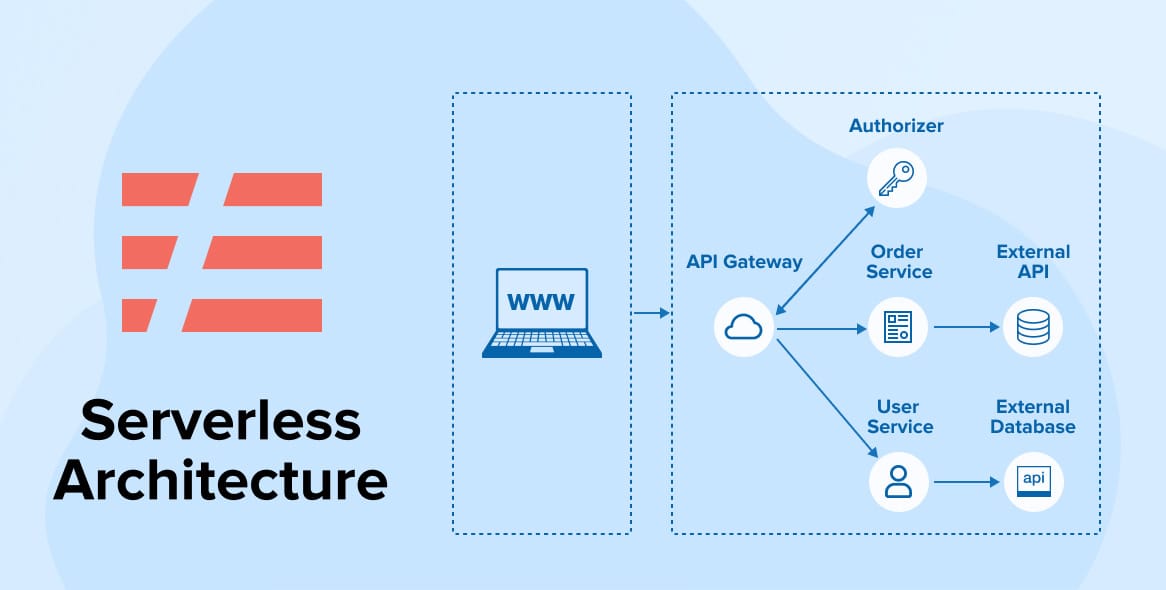
We went all-in. API Gateway + Lambda + DynamoDB. The serverless dream.
The Reality Check
Month 1 bill: $12,000. We nearly fell off our chairs.
Where the Money Went
Lambda Invocations
We had 50 million Lambda invocations. At $0.20 per million requests, that's $10.
But duration matters. Our functions ran for 500ms average. At 1GB memory, that's $8,333/month.
A $5/month EC2 instance could handle the same load.
API Gateway
API Gateway costs $3.50 per million requests. We had 10 million API calls. That's $35.
But we also paid for data transfer: $0.09/GB. With 500GB transferred, that's $45.
Total API Gateway cost: $80/month. Not terrible, but adds up.
DynamoDB
DynamoDB pricing is complex:
- Read capacity units
- Write capacity units
- Storage
- Backups
We used on-demand pricing. Seemed simple. But reads and writes added up fast.
Our DynamoDB bill: $3,200/month.
A managed PostgreSQL instance: $50/month.
CloudWatch Logs
We logged everything. Every Lambda invocation. Every error. Every debug message.
CloudWatch charges for:
- Ingestion: $0.50/GB
- Storage: $0.03/GB/month
We generated 100GB of logs. Cost: $50/month for ingestion, $3/month for storage.
Lesson: Log less. Or use cheaper alternatives.
Data Transfer
AWS charges for data transfer between services. Lambda to DynamoDB. Lambda to S3. API Gateway to Lambda.
These "small" charges added up to $400/month.
The Hidden Costs
Cold Starts
Lambda functions have cold starts. First invocation is slow. Users complained.
Solution: Provisioned concurrency. Keeps functions warm.
Cost: $0.015 per GB-hour. For 10 functions at 1GB, that's $1,080/month.
Now we're paying to NOT use serverless benefits.
Development Complexity
Serverless is harder to develop:
- Local testing is painful
- Debugging is harder
- Deployment is slower
We spent 30% more developer time. That's a hidden cost.
Vendor Lock-In
Our code is tightly coupled to AWS:
- Lambda-specific code
- DynamoDB queries
- API Gateway configurations
Migrating would take months. That's a cost.
What We Changed
1. Moved to ECS
We rewrote our API using ECS (Elastic Container Service).
Cost: $200/month for 4 containers.
Same functionality. 95% cost reduction.
2. Switched to PostgreSQL
DynamoDB was expensive and limiting. We moved to RDS PostgreSQL.
Cost: $50/month.
Bonus: SQL is easier than DynamoDB queries.
3. Reduced Logging
We log errors and important events. Not every request.
CloudWatch cost: $5/month.
4. Used Lambda Strategically
We still use Lambda for:
- Scheduled jobs
- Event processing
- Image resizing
Things that run occasionally. Not our main API.
When Serverless Makes Sense
Serverless is great for:
- Unpredictable traffic
- Infrequent workloads
- Event-driven architectures
- Rapid prototyping
Serverless is expensive for:
- Steady traffic
- High-frequency requests
- Long-running processes
- Predictable workloads
Cost Comparison
Our Serverless Stack
- Lambda: $8,333
- API Gateway: $80
- DynamoDB: $3,200
- CloudWatch: $53
- Data Transfer: $400
- Total: $12,066/month
Our New Stack
- ECS: $200
- RDS PostgreSQL: $50
- CloudWatch: $5
- Load Balancer: $20
- Total: $275/month
44x cheaper.
Lessons Learned
- Do the math: Calculate costs before going serverless
- Monitor spending: Set up billing alerts
- Start small: Don't go all-in on serverless
- Use the right tool: Serverless isn't always the answer
- Optimize early: Small inefficiencies become expensive at scale
How to Avoid Our Mistakes
1. Use AWS Cost Calculator
Estimate costs before building. Be realistic about traffic.
2. Set Billing Alarms
Get alerts when spending exceeds thresholds.
3. Optimize Lambda Functions
Reduce memory usage. Reduce execution time. Every millisecond costs money.
4. Choose the Right Database
DynamoDB is expensive. Consider RDS for relational data.
5. Log Strategically
Log errors and important events. Not everything.
The Bottom Line
Serverless isn't cheaper. It's different.
For unpredictable workloads, it's great. For steady traffic, traditional infrastructure is cheaper.
Do the math. Monitor costs. Choose wisely.
We learned the hard way. You don't have to.