
My Journey from Monolith to Kubernetes: What They Don't Tell You
My Journey from Monolith to Kubernetes: What They Don't Tell You
Everyone talks about the benefits of Kubernetes. What they don't talk about is the six months of pain, the 3 AM incidents, and the moment you question every life decision that led you here.
This is that story.
The Starting Point
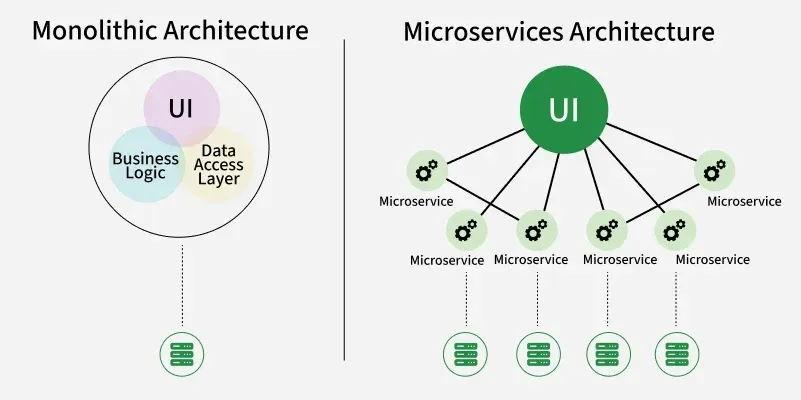
We had a Django monolith running on three EC2 instances behind a load balancer. It worked fine for two years. Then we hit 100,000 users and things started breaking.
Deployments took 15 minutes. Scaling meant manually spinning up new EC2 instances. And when one service needed more resources, we had to scale everything.
Kubernetes seemed like the answer. Spoiler: it was, but not in the way I expected.
The Decision
Our CTO came back from a conference excited about Kubernetes. "We need to modernize," he said. "Everyone's using it."
Red flag #1: Making technical decisions based on conference hype.
But he wasn't wrong about our scaling problems. We needed something better. So we committed to the migration.
Month 1: The Learning Curve
Kubernetes has a steep learning curve. Pods, deployments, services, ingress, config maps, secrets, persistent volumes... the concepts kept coming.
I spent two weeks just understanding the basics. Then another two weeks setting up a local cluster with Minikube.
The documentation is comprehensive but overwhelming. Every tutorial assumes you know things you don't.
Month 2: The First Deployment
We decided to start small: move our background job workers to Kubernetes.
Here's what a simple deployment looks like:
apiVersion: apps/v1
kind: Deployment
metadata:
  name: worker
spec:
  replicas: 3
  selector:
    matchLabels:
      app: worker
  template:
    metadata:
      labels:
        app: worker
    spec:
      containers:
      - name: worker
        image: myapp/worker:latest
        env:
        - name: DATABASE_URL
          valueFrom:
            secretKeyRef:
              name: db-secret
              key: url
Simple, right? Wrong.
We spent a week debugging why pods kept crashing. Turns out, our health checks were too aggressive. The workers needed 30 seconds to start, but we were killing them after 10.
Month 3: The Networking Nightmare
Getting services to talk to each other was harder than expected.
Our monolith needed to communicate with the workers. The workers needed to access the database. Everything needed to access Redis.
Kubernetes networking is powerful but complex. We had to learn about:
- ClusterIP vs NodePort vs LoadBalancer
- Ingress controllers
- Network policies
- DNS resolution
We made it work, but it took three weeks and countless hours of debugging.
Month 4: The Storage Problem
Our app uploads files. In the monolith, we just wrote to disk. In Kubernetes, pods are ephemeral. Storage is complicated.
We tried:
- Persistent Volumes: Too slow for our use case
- EBS volumes: Better, but complex to manage
- S3: Finally, the right solution
Lesson learned: Don't fight Kubernetes' ephemeral nature. Embrace it and use external storage.
Month 5: The Great Outage
At 2:47 AM, our monitoring went crazy. The entire app was down.
What happened? We updated a deployment and forgot to set resource limits. One pod consumed all available memory, causing a cascade failure.
Kubernetes kept trying to restart pods, but they'd immediately crash. The cluster was in a death spiral.
We rolled back, but the damage was done. 4 hours of downtime. Angry customers. A very uncomfortable post-mortem meeting.
The fix was simple:
resources:
  requests:
    memory: "256Mi"
    cpu: "250m"
  limits:
    memory: "512Mi"
    cpu: "500m"
Always set resource limits. Always.
Month 6: The Breakthrough
Something clicked. We stopped fighting Kubernetes and started working with it.
We embraced:
- Horizontal Pod Autoscaling: Let Kubernetes scale for us
- Rolling updates: Zero-downtime deployments
- Health checks: Proper liveness and readiness probes
- Helm charts: Templated deployments
Deployments that took 15 minutes now took 2 minutes. Scaling was automatic. And we could deploy multiple times per day without fear.
What I Wish I Knew
1. Start with Managed Kubernetes
We tried to run our own cluster. Bad idea. Use EKS, GKE, or AKS. Let someone else handle the control plane.
2. Invest in Observability
Kubernetes makes debugging harder. You need:
- Centralized logging (we use Loki)
- Metrics (Prometheus)
- Tracing (Jaeger)
- Dashboards (Grafana)
3. Use Helm
Managing raw YAML files is painful. Helm makes it manageable.
4. Automate Everything
CI/CD is essential. We use GitOps with ArgoCD. Every commit triggers a deployment.
5. Plan for Costs
Kubernetes isn't free. Our AWS bill increased 40% initially. We optimized it down, but budget accordingly.
The Results
After a year on Kubernetes:
- Deployments: 15 minutes → 2 minutes
- Scaling: Manual → Automatic
- Downtime: Monthly → Quarterly
- Developer productivity: Up 30%
But it came at a cost:
- 6 months of migration pain
- Increased operational complexity
- Steeper learning curve for new team members
Should You Use Kubernetes?
Honestly? It depends.
Use Kubernetes if:
- You have multiple services
- You need to scale dynamically
- You have the team to manage it
- You're already using containers
Don't use Kubernetes if:
- You have a simple monolith
- Your team is small
- You don't have DevOps expertise
- Heroku or similar PaaS works fine
Kubernetes is powerful, but it's not a silver bullet. It's a tool that solves specific problems. Make sure you have those problems before adopting it.
For us, it was the right choice. But it was harder than anyone admitted.